
1
Customer
- Confusing steps
- Long waits
- Unclear next action
Find The First Fix
When the website, inboxes, spreadsheets, tools, and team routines all feel tangled together, map one real situation from beginning to end. Seeing what the customer experiences, what the team does, where the information lives, and which tools are involved makes the first useful fix much easier to find.
Four-part diagnostic
Small-business technology problems rarely arrive with neat labels. A customer submits a form, but nobody notices until the next day. A job status lives in a spreadsheet, while the latest decision lives in a text message. The website says one thing, the team explains another, and a new tool has somehow created more places to check instead of fewer. It can feel as though the whole business needs to be rebuilt. Usually, it does not. Choose one recent example and follow it from the customer’s first step until the work is complete. The goal is not to diagram the entire company. It is to find the earliest place where one important piece of work becomes confusing, delayed, unreliable, or unnecessarily difficult.
A broad complaint such as “our technology is a mess” is too large to investigate. One recent situation gives the map a beginning, an ending, and something concrete to follow.
Choose a quote request, appointment, payment, support request, completed job, weekly report, or another event that actually happened. Write where it began and what should have been true when it was finished. That boundary keeps the exercise useful instead of turning it into an inventory of every frustration in the business.
Follow what the customer sees, understands, provides, receives, and waits for. A form that sends successfully can still create a poor experience when the customer receives no confirmation, no timing expectation, and no useful next step.
Mark the first moment they might hesitate, choose the wrong option, repeat information, or wonder whether anything is happening. Customer uncertainty often reveals a missing explanation or expectation before it reveals a software problem.
Now trace the same situation through the people, information, and tools inside the business. Include the awkward workarounds; they are often where the real explanation lives.
Do not map the ideal procedure from a handbook. Follow the real version: who notices the request, who decides what happens next, where it waits, which side conversations occur, and what depends on someone remembering. If the usual owner is unavailable, record what actually happens then too.
Untidy steps are not a failure of the exercise. They show where ownership, timing, or the handoff has never been made visible enough for the team to trust.
Follow each important detail from where it first appears to where it is copied, changed, stored, checked, and trusted. The same request may appear in a form, email, text message, spreadsheet, calendar, estimate, task board, and someone’s memory.
Every detail does not need to live in one system. People do need to know which place contains the current answer, who corrects it, and whether the next person can find it without asking around.
Beside every tool, write what it helps with, what information it holds, what extra work it creates, whether people trust it, and who owns it. Avoid deciding too early that the visible software is the culprit.
A spreadsheet may be doing its job while follow-up has no owner. A form may work correctly while its destination inbox is rarely checked. A new platform can reproduce the same confusion in a more expensive interface when the process around it remains unclear.
Working map
Look backward from the visible symptom. The earliest repeated breakdown is usually the strongest first fix.
The loudest symptom often appears later than the cause. Look for the earliest repeated breakdown that creates several problems downstream.
Circle moments of customer uncertainty, waiting, duplicate entry, missing ownership, conflicting records, memory-based follow-up, repeated questions, and tools that create more work than they remove. Then distinguish an occasional annoyance from trouble that appears weekly, monthly, or whenever one person is unavailable.
Repeated friction matters because it gives you something measurable. A useful change may reduce searching, copying, waiting, missed replies, or customer confusion—not simply make the system feel newer.
Late follow-up may begin with no clear owner. Duplicate entry may begin because two teams trust different records. A confusing dashboard may begin because nobody agreed on what the statuses mean. Keep asking what happened immediately before the problem until you reach the earliest change that could prevent the trouble that follows.
That point is often smaller and less dramatic than the symptom. It is also more likely to improve several later steps at once.
A useful discovery conversation can begin with one real example, the tools involved, screenshots or notes that show the problem, the people who touch it, what happens when it fails, and what a better result would look like. The material does not need to be presentation-ready.
Remove passwords, private records, and confidential customer information before sharing anything through an insecure channel. The goal is enough context to understand the path—not unnecessary exposure of sensitive details.
Match the response to the cause. The first improvement should reduce uncertainty and create evidence before the business commits to a larger project.
The right first move may be language, documentation, a simpler process, a careful connection, a contained automation, or a genuine tool repair. Do not choose the largest category merely because the overall situation feels messy.
Name what will change, who owns it, which examples will be tested, and what should become easier. A useful first step is specific enough that everyone can recognize whether it happened and whether it helped.
For example: every quote request will enter one shared list with a received date, visible owner, current status, and next step. That is clearer and easier to evaluate than “improve lead management.”
Test the change with the next five or ten relevant situations. Look for fewer customer questions, less searching, clearer ownership, faster handoffs, or more trustworthy information. Also watch for new work the change accidentally creates.
One small test provides better evidence than a large software purchase based on assumptions. Expand only after the first change shows what the business actually needs next.
Visual guide
Before fixing the tech mess, map where the mess actually lives.
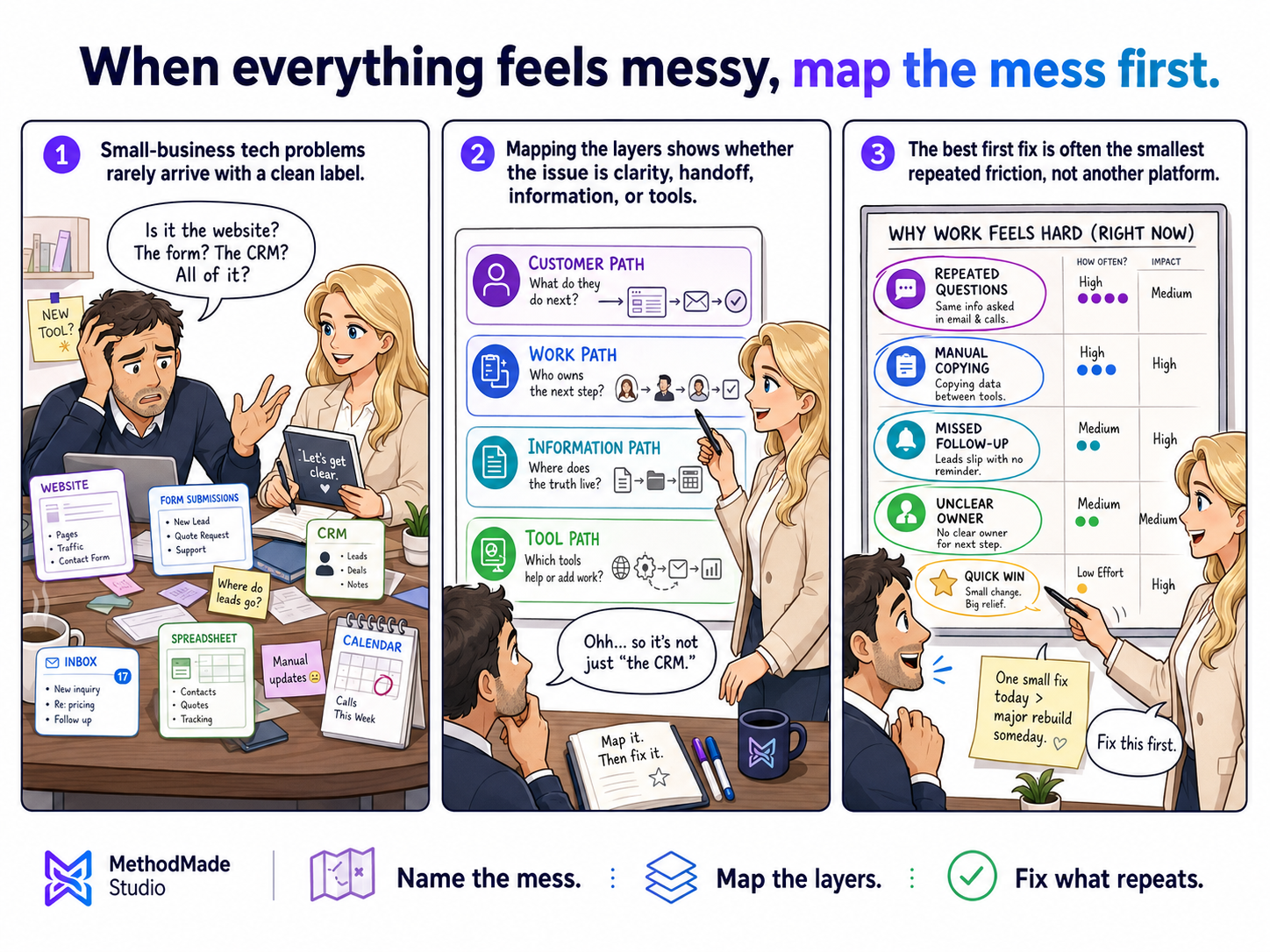
Your action plan
A one-page map showing where customers get confused, where work gets stuck, where information becomes unreliable, and which first fix is most likely to help.
Want help applying this?
If this guide describes part of what your business is dealing with, tell us what is happening. We can decide whether there is a useful project, clarify the scope, and estimate it around the actual work involved.
A natural next step
The guide or story below builds naturally on what you just read.
Related practical guide
Audit the website before choosing the project. A cleanup may solve outdated details and broken paths; a refresh may improve content and presentation; a rebuild is justified only when the foundation cannot support what the business now needs.
Read guide →Related experience story
I treated the struggling software and the disconnected team as one system. After stabilizing DisputeFlow 2, we evolved it into DisputeFlow 2.1 so recurring merchant variation could be handled through reusable capabilities instead of repeated one-off engineering.
Read story →Please don’t share passwords, payment details, medical information, or other sensitive data here.