
1
Understand
- Someone else can use it
- Terms mean one thing
- Instructions exist
Spreadsheet Checkup
A spreadsheet can be the right tool and still need more care once the business depends on it. Answer seven plain questions to decide whether to keep it, tidy it up, connect it to other tools, or begin planning a replacement.
Seven-question checkup
Spreadsheets are flexible, familiar, and often exactly right for a growing business. Trouble begins quietly: more people depend on the file, formulas become fragile, several copies appear, and one person becomes the only person who understands how it works. Score each question from 0 to 2: 0 means no or under control; 1 means sometimes or not sure; 2 means yes or regularly creates trouble or risk. Write an example for every 1 or 2. The total guides attention; it does not automatically select a new tool.
The spreadsheet becomes a system when people rely on it for truth, ownership, status, decisions, or daily work—not merely because it contains a lot of rows.
Ask whether another responsible person could understand the columns, formulas, statuses, instructions, and next steps without the usual owner explaining everything. If the file only works because one person remembers the unwritten rules, the risk lives in the process as much as the spreadsheet.
Review terms, colors, abbreviations, dates, status values, and completion rules. If two people interpret “done,” “active,” or a red cell differently, the file is not producing one shared answer.
Write the definitions that affect real decisions. Small language differences can create larger reporting and follow-up problems later.
A useful spreadsheet needs more than correct formulas. People need confidence in the data, appropriate access, and a recovery path when something goes wrong.
Look for missing fields, duplicates, stale records, overwritten formulas, manual corrections, unexplained blanks, and conflicting copies. Check whether people can tell when information was last updated and who is responsible for correcting it.
Decide who may view, edit, export, share, or change formulas. Sensitive customer, employee, financial, legal, or operational information should not become broadly accessible merely because sharing a link is convenient.
Protect critical formulas and fields while keeping ordinary work practical enough that people do not create unofficial copies to get around the controls.
Confirm version history, backups, account ownership, exports, recovery instructions, and what happens if the file is deleted, corrupted, locked, or tied to a departing employee’s account.
The more the business depends on the spreadsheet, the less acceptable it is for recovery to consist of hoping someone has an old attachment in email.
The file may still be the right tool while a few repeated burdens need cleanup, connection, or better structure.
Measure duplicate entry, reformatting, manual reminders, repeated reports, status checking, and corrections. Notice which steps are stable and predictable versus which require judgment or context.
A spreadsheet does not need to be replaced simply because it has manual work around it. Sometimes a form, protected view, clearer formula, validation rule, or contained automation removes the real burden.
Describe the operational consequence. Could the business reconstruct current work? Would customers, payments, schedules, inventory, reporting, or compliance be affected? Would one person know how to rebuild it—or would the process stop completely?
The consequence determines how much documentation, backup, testing, and ownership the file deserves today.
Operational scorecard
A single serious access or recovery risk can matter more than the total score.
The score is a prompt for judgment, not an automatic command to buy software. Review the examples behind the number before deciding what changes.
Score each question 0, 1, or 2 and review every example that received a 1 or 2. A low total with one serious access or recovery risk may still deserve urgent attention.
Keep the spreadsheet when it remains understandable, trustworthy, recoverable, and proportionate to the work. Stabilize it when definitions, access, formulas, ownership, or backups are weak. Connect only clear, stable steps. Compare replacement options when volume, risk, permissions, complexity, or dependence have outgrown what the file can responsibly support.
Do not replace a mission-critical spreadsheet casually. Preserve exports, definitions, formulas, ownership, historical context, and a rollback path. Test the new process with representative work before retiring the old one.
The goal is a safer business system—not a dramatic migration that loses the knowledge hidden inside the file.
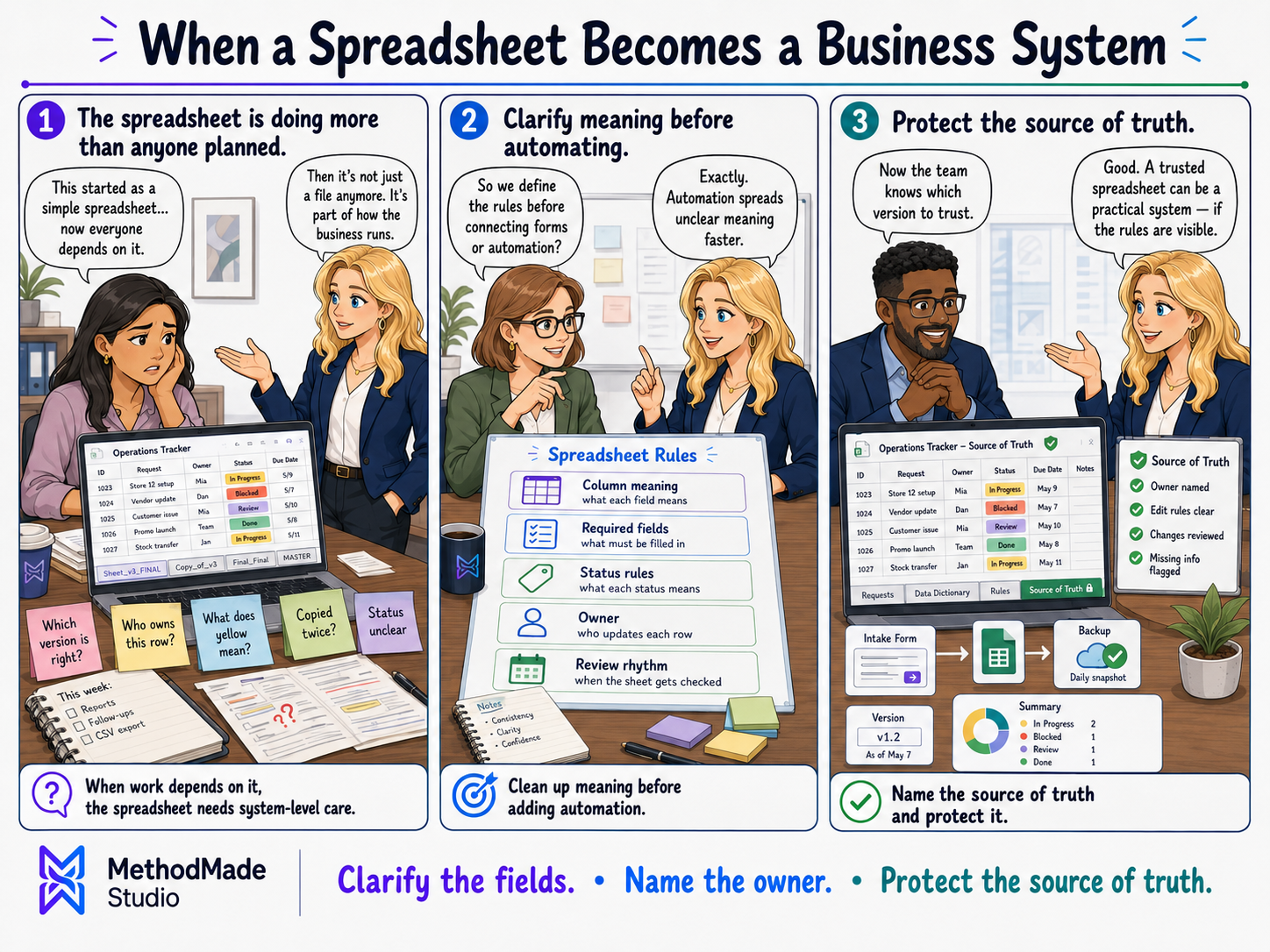
Visual guide
When the business depends on the spreadsheet, treat it like a system.
Your action plan
A seven-question score, examples of the current risk, and a recommendation to keep, stabilize, connect, or replace the spreadsheet.
Want help applying this?
If this guide describes part of what your business is dealing with, tell us what is happening. We can decide whether there is a useful project, clarify the scope, and estimate it around the actual work involved.
A natural next step
The guide or story below builds naturally on what you just read.
Please don’t share passwords, payment details, medical information, or other sensitive data here.